
How to Communicate With Artists During an Open Call (From Questions to Results)
In our previous article, I covered how to promote a call for artists. Once artists start applying, the messages start too. Artists write by email, in Instagram DMs, and in the comments on your posts to ask what time the deadline closes in their time zone, if their payment went through, and when they'll hear back.
Answering each one separately takes hours every week the call is open, and artists who never get an answer remember it the next time you open a call.
The good news is that most of these messages ask for the same few things. I'll show you where to put each answer, what to tell artists at each stage, and how to send results without leaving anyone waiting, with example messages you can adapt.
Quick Answer: How to Communicate With Artists During an Open Call
-
Put the deadline, time zone, fee, results date, and a contact email on your call page, and link to it in every reply
-
Answer rule questions once in public, for example in the Q&A on an EntryThingy call page, and handle payment issues privately
-
Tell artists what happens next right after they submit, including the date results come out
-
Announce changes on your call page first, then by email to applicants and on Instagram
-
Send results to every applicant on the date you promised, with all statuses set at the same time
-
Write acceptance emails around the next deadline the artist has to meet
-
Give the decision in the first two sentences of a rejection email
-
Tell waitlisted artists their status and a firm date
-
Send selected artists one short email per milestone, from delivery to pickup
1. Make Your Call Page the One Place Artists Check for Answers
Artists often ask the same questions by email, in DMs, and in comments. To avoid answering them over and over, make sure your call page includes all the information artists need. That way, you can simply reply with a short message and a link instead of explaining the rules each time.
Before the call opens, check that your call page shows:
-
The deadline with the exact time and time zone
-
The entry fee and what it covers
-
The date artists will hear about results, and how
-
Delivery and pickup dates for selected work
-
An email address for payment and entry problems
Our checklist for writing a call for artists covers the rest of the details a call page needs, from eligibility to sales terms.
Then point every reply to that page. When someone asks in a DM when the deadline is, answer in one line and add the link: "The deadline is March 6 at 11:59 p.m. Eastern. All the details are on the call page: [link]." Artists then see the current version of your call, including any change you've made since they first saw it.
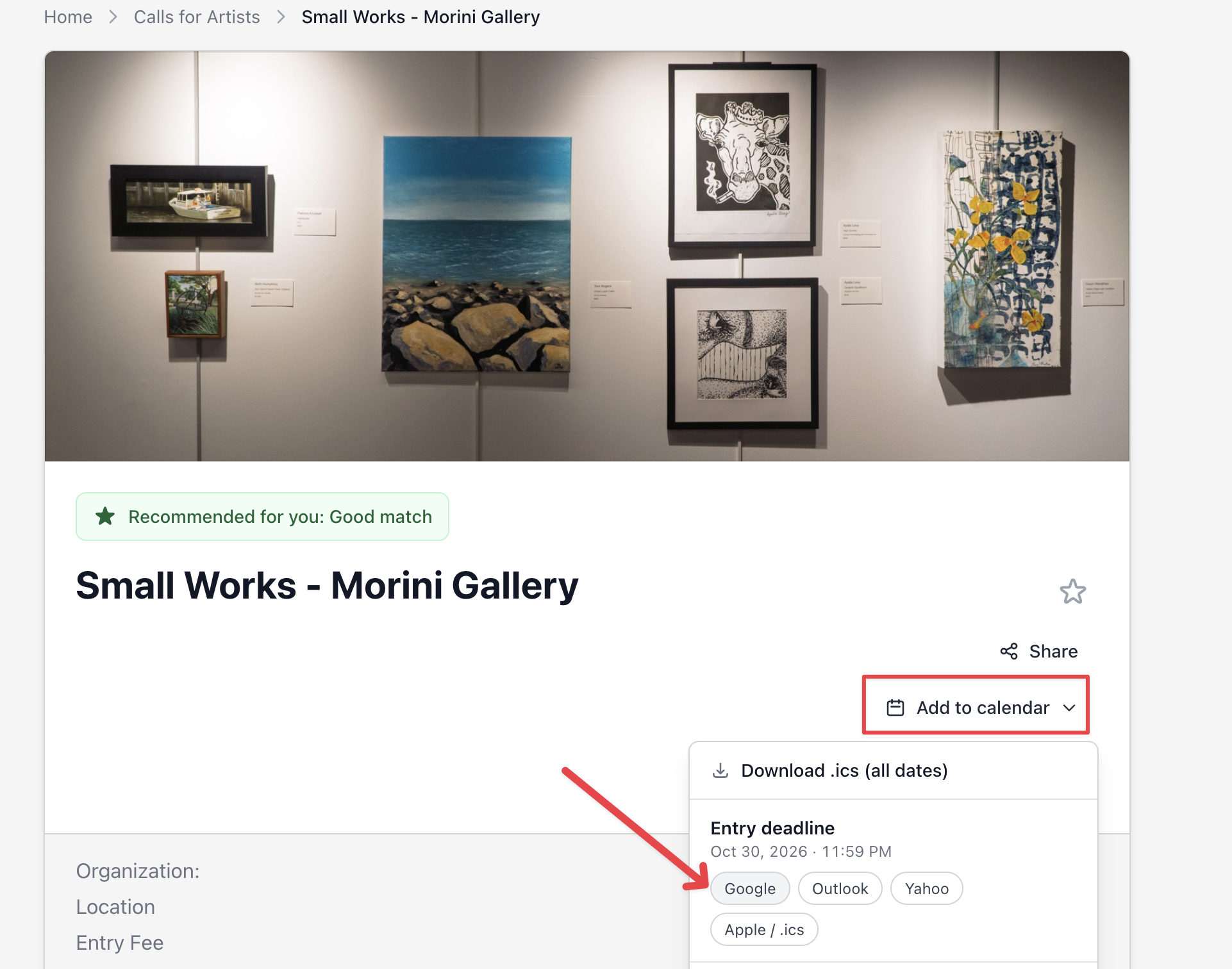
For example, on EntryThingy, the call page shows the organization, location, entry fee, deadline, and exhibition dates together in one panel. Artists can also save the deadline with Add to calendar, so fewer of them write to ask when the call closes.
Here's how that looks on EntryThingy, with the entry deadline ready to add to Google, Outlook, Yahoo, or Apple Calendar:
2. Answer Rule Questions Once, Where Every Artist Can See Them
Questions about your rules, like "Can I submit a diptych as one piece?" or "Do works need to be framed?", are rarely asked by only one artist. A private reply answers one person, and the next artist sends the same question tomorrow. A public answer, posted where artists read the call, answers everyone who comes after.
You can post public answers in a few places:
-
An FAQ section in your call description that you update as questions come in
-
An Instagram Story highlight that collects your answers to the most common questions
-
A Q&A section on the call page, if your submission platform has one
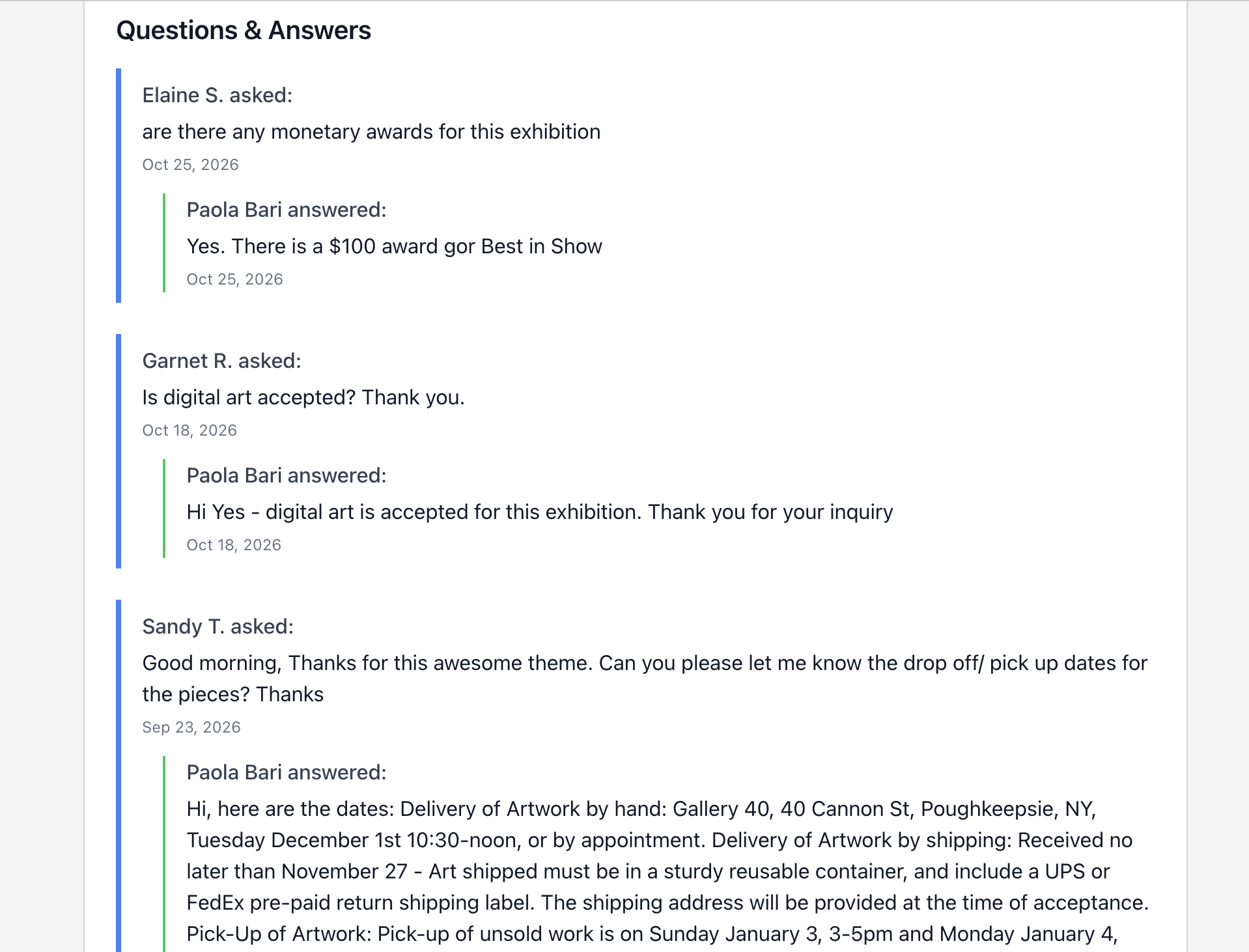
For example, on EntryThingy, every call page has a public Q&A at the bottom. Artists ask a question, you get an email alert, and your answer appears on the call page for everyone, with the artist shown by first name and last initial. Here's how that looks at the end of a public call page on EntryThingy. Notice what artists asked about: awards, accepted media, and delivery dates.
You'll see new questions:
-
In your email, as soon as an artist asks
-
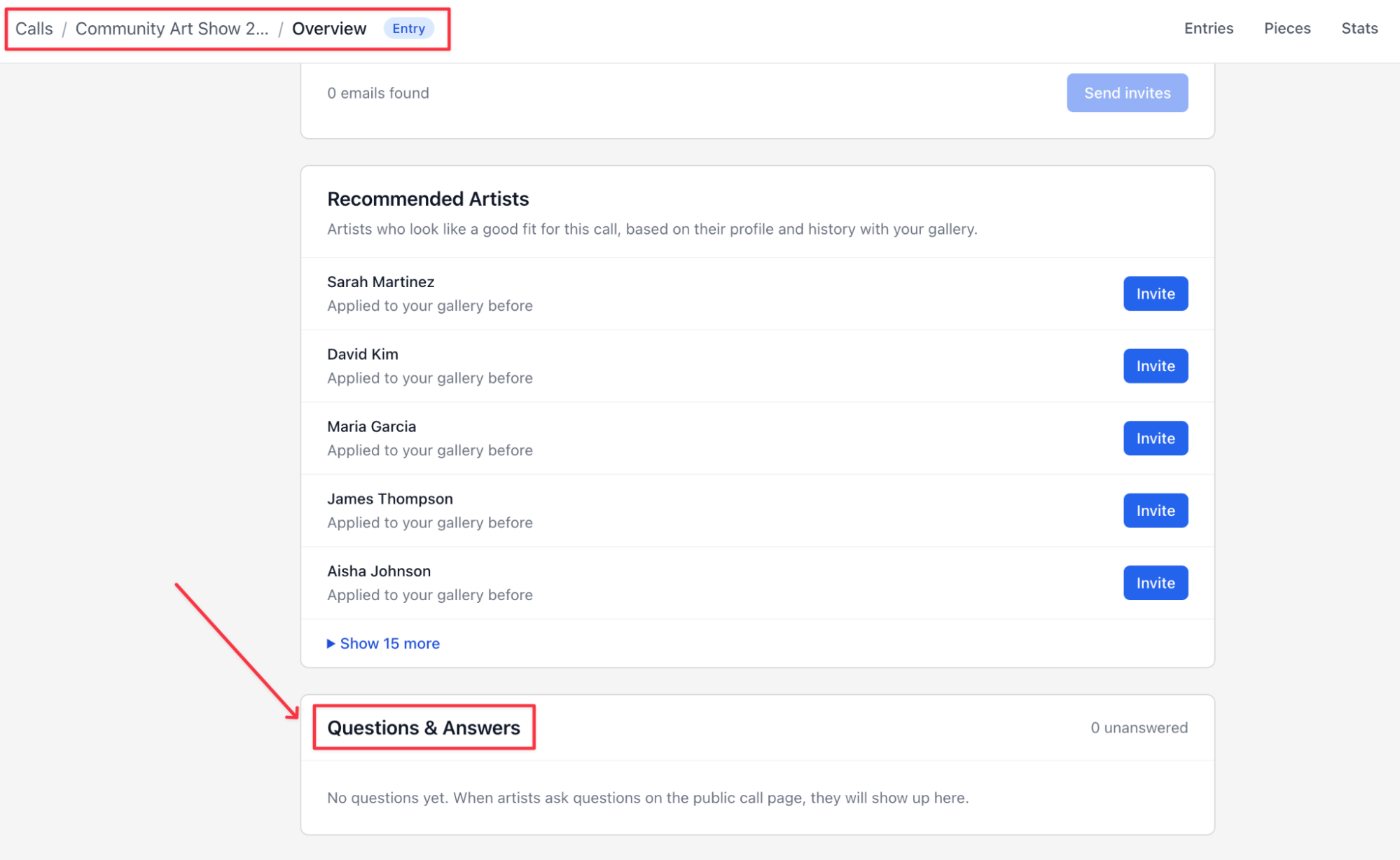
In the Questions & Answers section on your call's Overview, with the number still unanswered
Here's how that looks on your call's Overview, right below Recommended Artists:
Our help guide on questions and answers explains how to answer a question, edit an answer, or keep a question private.
Wherever you post it, a useful answer states the rule, adds any condition, and tells artists exactly what to do. For example:
Q: Can I submit a diptych as one piece?
A: Yes, as long as the panels are sold together and meant to hang as a single work. Upload one image that shows both panels together and list the combined dimensions. Each diptych counts as one of your three pieces.
A plain "yes" would leave artists guessing about the image and the piece count. If an answer clarifies a rule, add it to the call description too.
Keep personal questions private. A double charge, a wrong upload, or a withdrawal involves one artist's entry and payment, so reply by email.
3. Tell Artists What Happens Next Right After They Submit
Once an artist pays the entry fee, they start waiting for results. If nothing tells them when results come out, they will write to you, usually around the deadline when you're busiest. A short message right after they submit sets their expectations for the whole wait.
Your post-submission message should tell artists:
-
The results date and how they'll hear
-
The email address results will come from, so the message doesn't land in spam
-
If they can still edit their entry, and until when
-
Who to contact about payments or mistakes
-
Delivery dates to keep free if they're selected
Here's an example message:
Thank you for entering [Call name]. Your entry is complete, and you can view it anytime in your account.
Jurying takes place [dates]. We'll email every applicant on [results date] with the outcome. Emails will come from [address], so please add it to your contacts.
You can edit your entry until the deadline on [date]. For questions about payment or withdrawing your entry, email [contact address].
If your work is selected, you'll need to deliver it between [delivery dates], so please keep those dates free.
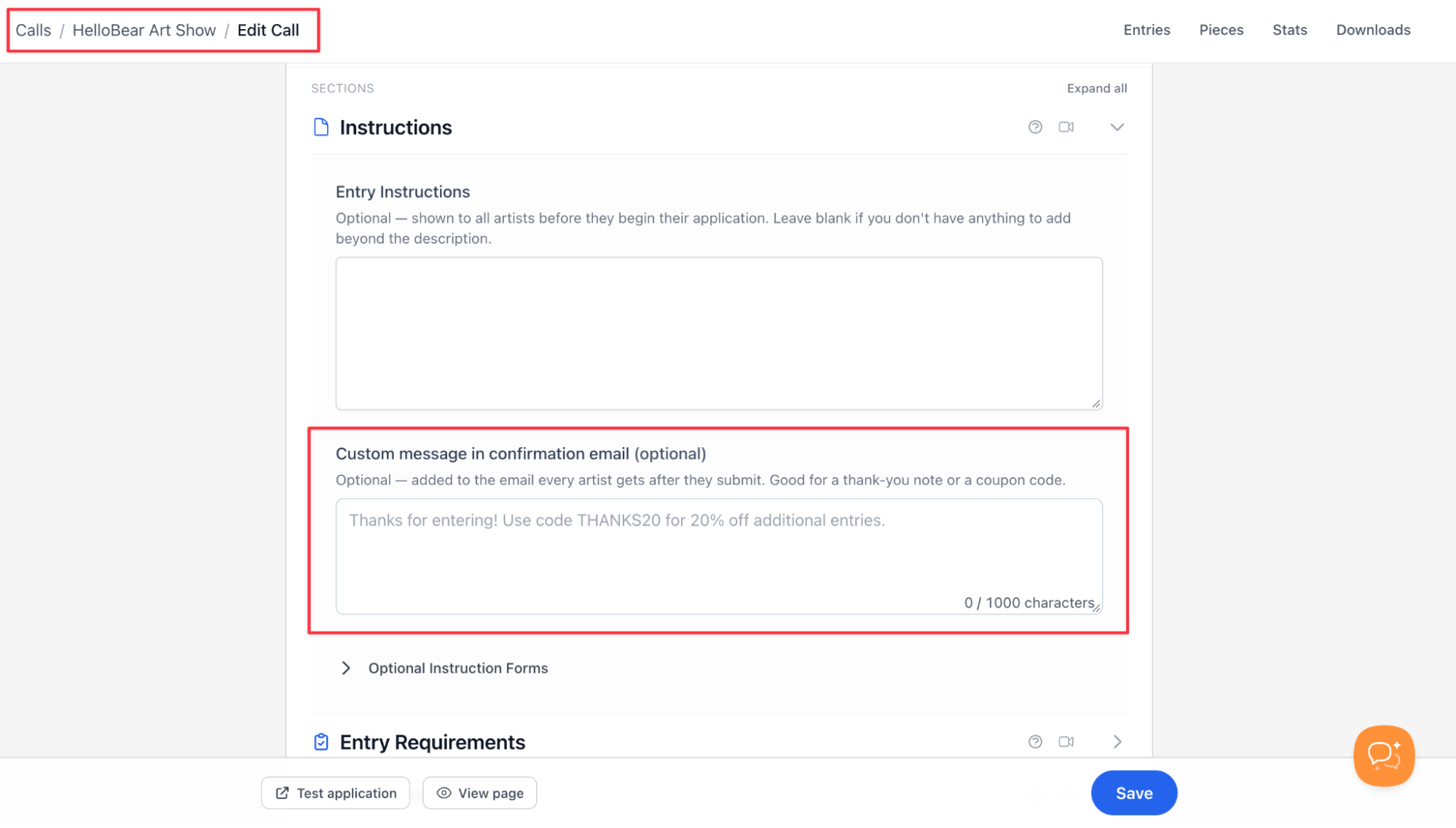
The best place for this message is the confirmation email. For example, on EntryThingy, artists automatically get a confirmation email with their entry number, and you can add your own message to it in the Custom message in confirmation email field when you set up your call. It holds up to 1,000 characters, which is enough for the example above.
Here's how that looks on EntryThingy, in the Instructions section of the call editor:
4. Announce Changes Where Artists First Saw Your Call
When you extend the deadline, fix a requirement, or move the results date, artists need to hear about it where they found the call. Some saw it on Instagram, some in a newsletter, and some have already applied. Update in this order:
-
Your call page. Change it first, so every link you've already shared shows the new information.
-
Applicants, by email. Artists who already submitted need to know if they have to do anything, which usually they don't. Artists who started an entry but didn't finish benefit most from a deadline extension.
-
Instagram and your newsletter. Post the change with the new date and a link to the call page.
-
Partner organizations that shared your call, so their posts aren't out of date.
Here's an example email for artists who already submitted:
Subject: [Call name]: deadline extended to [new date]
Hi [First name],
We've extended the deadline for [Call name] to [new date] at [time and time zone].
Your entry is complete, so you don't need to do anything. If you'd like to make changes, you can edit your entry until the new deadline.
Because of the extension, we'll now announce results on [new results date].
[Your name], [gallery]
On Instagram, keep it short: "Deadline extended: [Call name] now closes [date] at [time and time zone]. Link in bio."
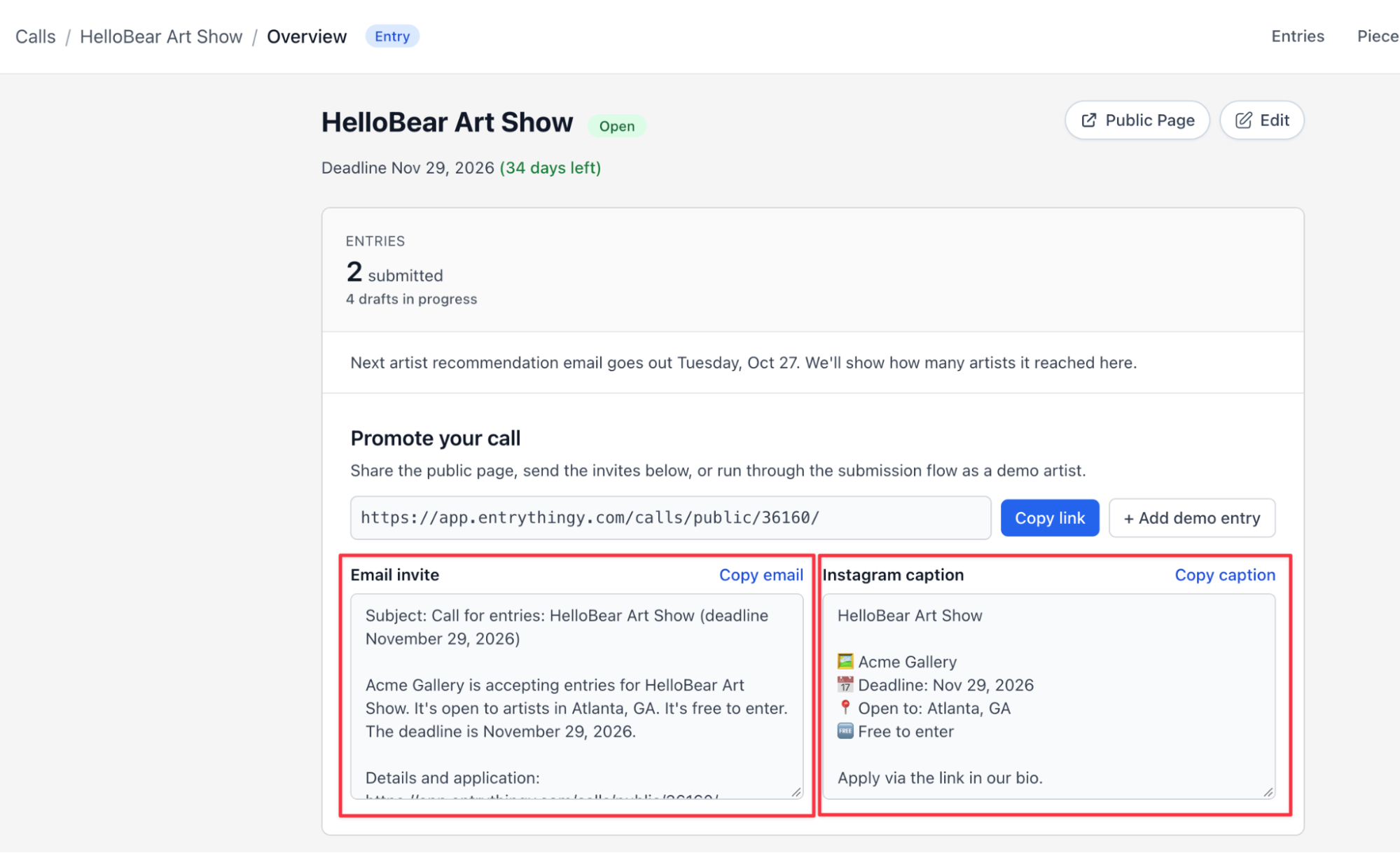
Also, keep in mind that you don't have to write the post or newsletter from scratch. For example, on EntryThingy, your call's Overview has a Promote your call section with a ready-made email and Instagram caption built from your call details. Copy one, add a line about what changed, and share it.
Here's how that looks on EntryThingy, with Copy email and Copy caption above each text:
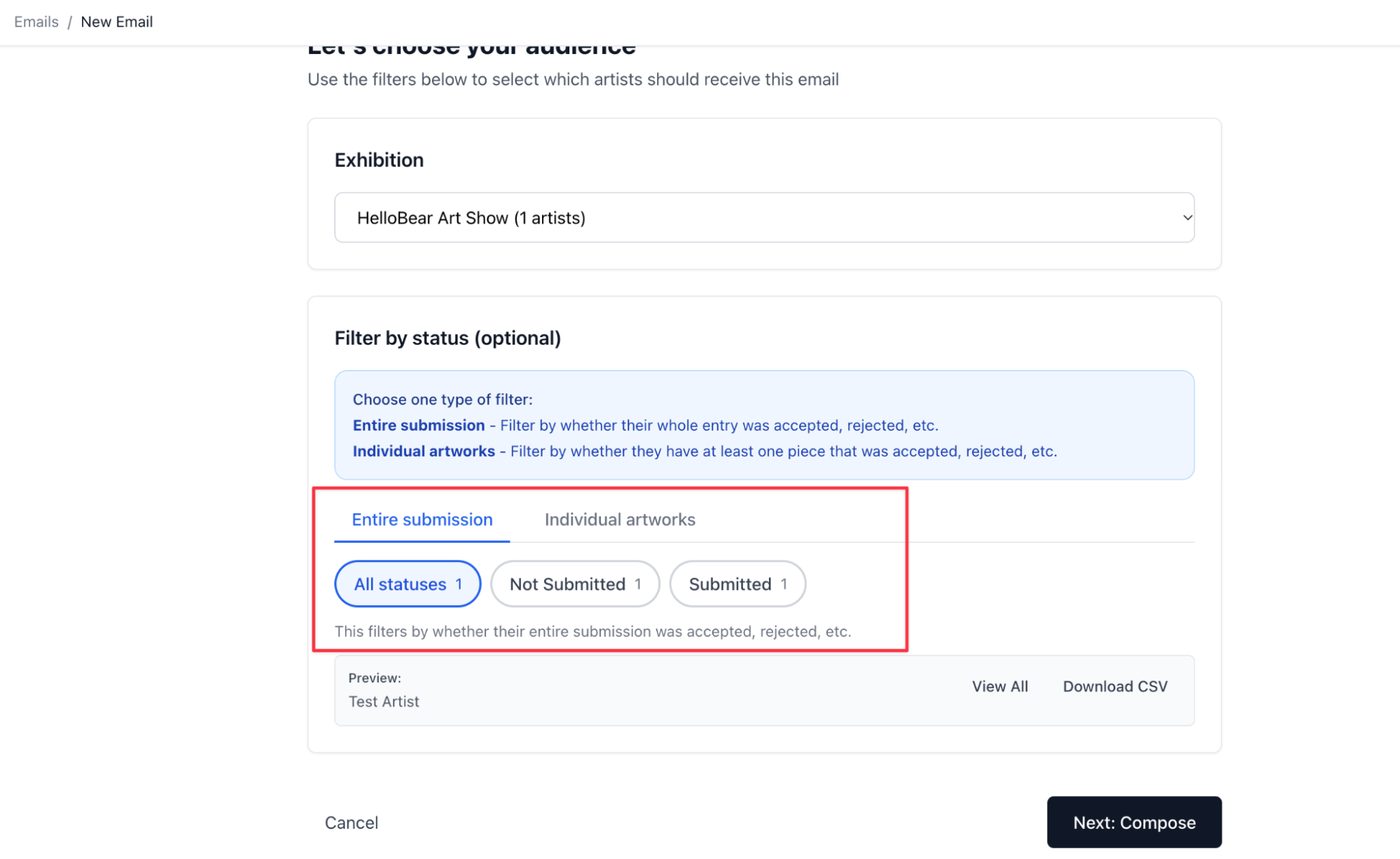
You can also use email to follow up with artists who have already started an application and those who haven't submitted one yet. Each group needs a different message, so send each its own version.
For example, on EntryThingy, the email tool filters recipients by entry status, including Submitted and Not Submitted, and shows how many artists each status includes. Here's how that looks on EntryThingy: choose your exhibition, keep Entire submission selected, and pick Submitted or Not Submitted.
For more information, you can check our help guide on emailing entrants that covers the filters, previews, and test emails.
5. Send Results to Every Applicant on the Date You Promised
Some galleries only notify the artists they select, and everyone else is left checking their inbox. An artist who paid an entry fee and never hears back can't tell if their work was even reviewed, so send a result to every applicant on the date you put in your call.
To make sure you meet that date, start planning a few days in advance. Ask jurors to finish their reviews early enough to leave time for any delays. You can then prepare your acceptance, rejection, and waitlist messages before results day, so each group receives an update at the same time.
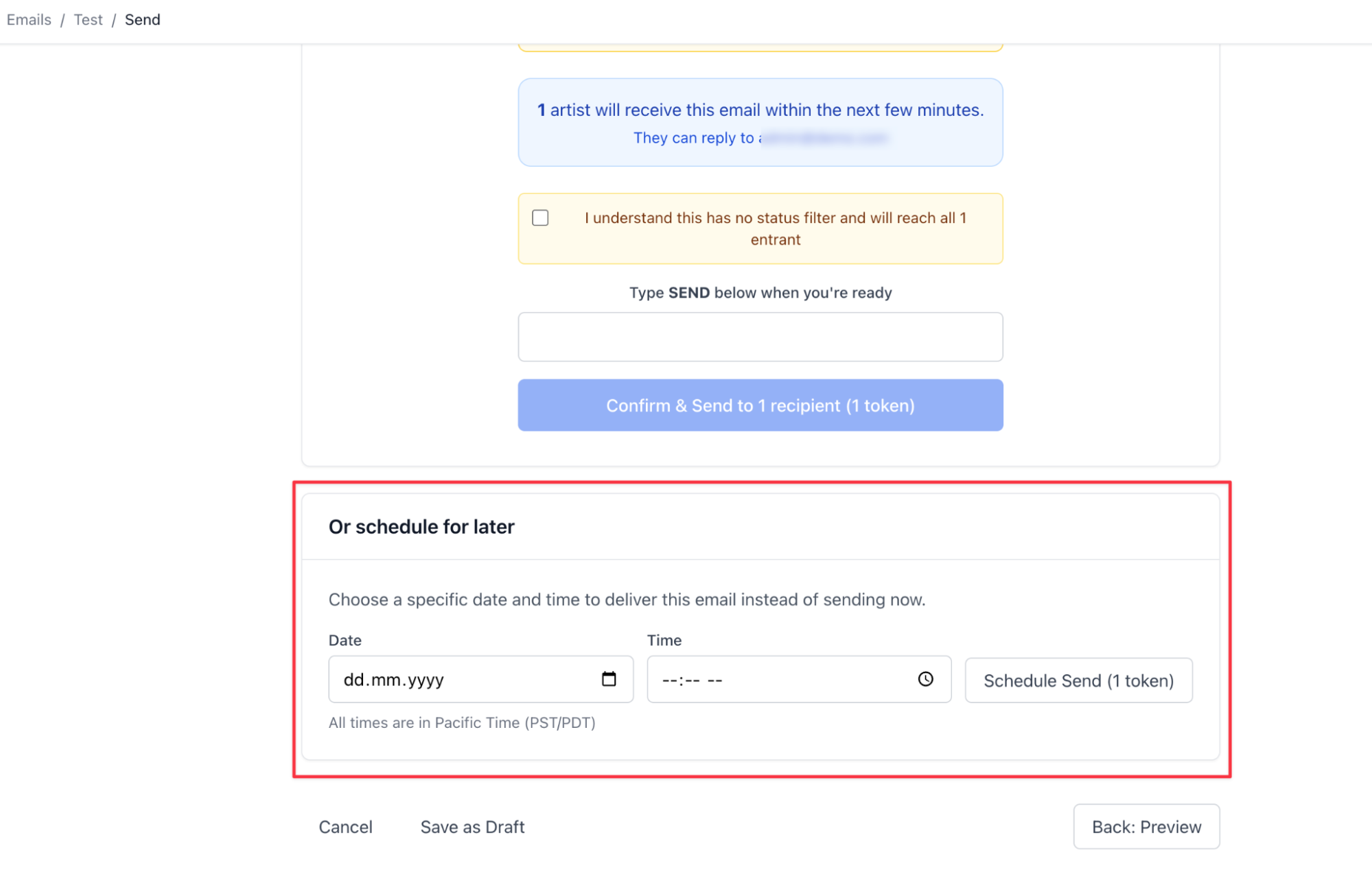
You can also schedule these emails in advance instead of sending them manually on results day. For example, EntryThingy's email tool has a Schedule Send option that lets you set all three messages for the morning of your results date while still allowing you to edit them before they go out.
Here's how that works on EntryThingy: in the last step, pick a date and time under Or schedule for later, then select Schedule Send. Times are in Pacific Time, so make sure to convert from your local time first.
One timing detail is easy to miss: on many platforms, artists see their status as soon as you change it. On EntryThingy, an entry marked Not Accepted appears on the artist's Applications page right away, before your email arrives. Our help guide on announcing jury results explains how each status appears to artists.
6. Write Acceptance Emails That Lead to the Next Deadline
When artists receive an acceptance email, they need to know what happens next. Lead with the good news, then go straight to the decision they need to make and when it's due. An acceptance email should include:
-
Which works were selected
-
The date by which the artist must confirm they'll take part
-
Delivery or shipping dates and the address
-
A link to the full terms, including commission and insurance
-
Who to contact with questions
If you accepted only some of an artist's works, name the selected pieces, so they know exactly what to bring.
Subject: Your work was selected for [Call name]
Hi [First name],
Congratulations! [Juror name] selected the following work for [Call name]:
[Selected works]
Please reply to this email by [date] to confirm you'll take part. If we don't hear from you by then, we may offer your place to another artist.
Artwork delivery is [dates and times] at [address]. Works must arrive ready to hang, with [labeling requirements]. You'll find the full terms, including our [percentage]% commission on sales and insurance details, here: [link]
We'll send details about the opening reception on [date] in a separate email.
[Your name], [gallery]
7. Write Rejection Emails That Give the Decision First
Receiving a rejection email can be disappointing for artists, so it's better to communicate the decision clearly rather than make them read through several paragraphs to find out. State the decision in the first two sentences, then provide some context. For example, mentioning that you received 400 entries for only 40 available places helps artists understand how competitive the selection process was without making assumptions about the quality of their work.
Subject: Your entry to [Call name]
Hi [First name],
Thank you for entering [Call name]. I'm sorry to let you know that your work wasn't selected for this exhibition.
We received [number] entries from [number] artists, and [Juror name] selected [number] works for [number] places. Many strong entries didn't make it into the show.
We'd love to see you at the opening reception on [date], and we hope you'll apply to future calls. You can follow our upcoming opportunities here: [link]
[Your name], [gallery]
Don't explain why a specific work wasn't selected unless you have the juror's actual reasoning. If you share juror notes with artists, an option covered in our juried show guide, tell artists where to find them.
8. Tell Waitlisted Artists Their Status and a Firm Date
On many submission platforms, a waitlisted entry still looks like it's under review, so waitlisted artists won't know where they stand unless you tell them. Some may be holding work for your show or turning down other calls while they wait.
If your waitlist is short and you'll know within days, you can wait until a place opens. If the wait could last weeks, tell them now and give a date:
Hi [First name],
Thank you for entering [Call name]. [Juror name] placed your work on our waitlist, which means it will be included if a selected artist withdraws.
We'll confirm by [date] either way. If a place opens, we'll ask you to confirm quickly, so please keep [delivery dates] free if you can.
[Your name], [gallery]
If a place opens, send that artist the acceptance email. On the confirmation date, send everyone left on the waitlist the rejection email.
9. Send Selected Artists One Email per Milestone, From Delivery to Pickup
After acceptance, artists need practical details at different times: where to deliver, when the opening is, how sales work, and when to collect their work. In this case, it’s better to send a short email when each detail matters rather than one long email with all the information at once.
Our guide for accepted artists tells them to check commission, shipping, insurance, and sales terms right away, so cover those in your acceptance email and use the milestones for the rest:
-
Delivery, two to three weeks before: dates, times, address, and packing and labeling requirements
-
Opening, once delivery is confirmed: date, time, guest policy, and images or text artists can share
-
Sales, when the show opens and again after a sale: how sales are recorded, the commission, and when artists get paid
-
Pickup or return, two weeks before the show closes: dates, times, return shipping, and what happens to unclaimed work
Adjust these timings to your exhibition schedule and how far your artists travel.
The opening is also the moment to communicate in public. Announce the selected artists on Instagram, tag them, and send them the images and caption ahead of time so they can share the show with their own followers. That brings their audiences to your opening, and it shows future applicants how you treat the artists you select.
Run Your Next Call With EntryThingy
On EntryThingy, artists find the key details of your call in one panel, ask questions in a public Q&A, and get your message in their confirmation email. When results are ready, you can email each group by entry status and schedule every message for your results date.
Create a gallery accountFAQs
How soon after the deadline should I announce results?
It depends on how many entries you get, how many jurors review them, and how many rounds you run. Put a specific results date in your call and keep it. If jurying runs late, email applicants before that date and give them the new one.
What should I do if I email the wrong group of artists?
Send a short correction to the same group as soon as you notice. Say what was wrong, give the correct information, and apologize briefly. Sent emails can't be recalled, so preview each email as one or two recipients from each group before you send.
Should I reply when a rejected artist asks for feedback?
Yes, even if your reply is short. Thank them and be honest about what you can share. If your jurors didn't leave notes, say you can't give individual feedback instead of guessing at a reason. If you run the call every year, tell them when it usually opens.