
As a gallery or arts organization, the way you run your jury process says a lot about who you are. Artists talk.
They share which calls were clear, which were fair, and which communicated results on time. A well-run juried show builds your reputation and brings stronger submissions the next time you open a call.
But getting there takes more than just finding the right juror. Most of the work happens before the call opens: choosing the right format, setting up scoring, briefing your jurors, and publishing deadlines you can actually keep. Once you put a date out there, artists are counting on it.
You need a clear process from the moment you create the call to the moment you announce results, one that works for you, for your jurors, and for the artists applying.
This guide walks through that process step by step on EntryThingy, based on what we have learned facilitating hundreds of juried shows on our platform.
Everything in This Guide Happens on EntryThingy
EntryThingy is a platform built specifically for galleries and arts organizations to manage calls for art, submissions, and jury processes. It handles everything in one place: collecting submissions, coordinating jurors, tracking scores, and notifying artists of results.
The steps in this guide follow exactly what you will see in your admin dashboard. If you are new to EntryThingy, you can create a free account and have your first call live in under ten minutes. If you are already using it, this guide will help you get more out of the process you already have.
If you are still comparing platforms, our roundup of tools for art galleries and our list of the best tools for art galleries to manage submissions are a good place to start.
Here is how it works, step by step.
How to Run a Juried Art Show on EntryThingy
Step 1: Create Your Call
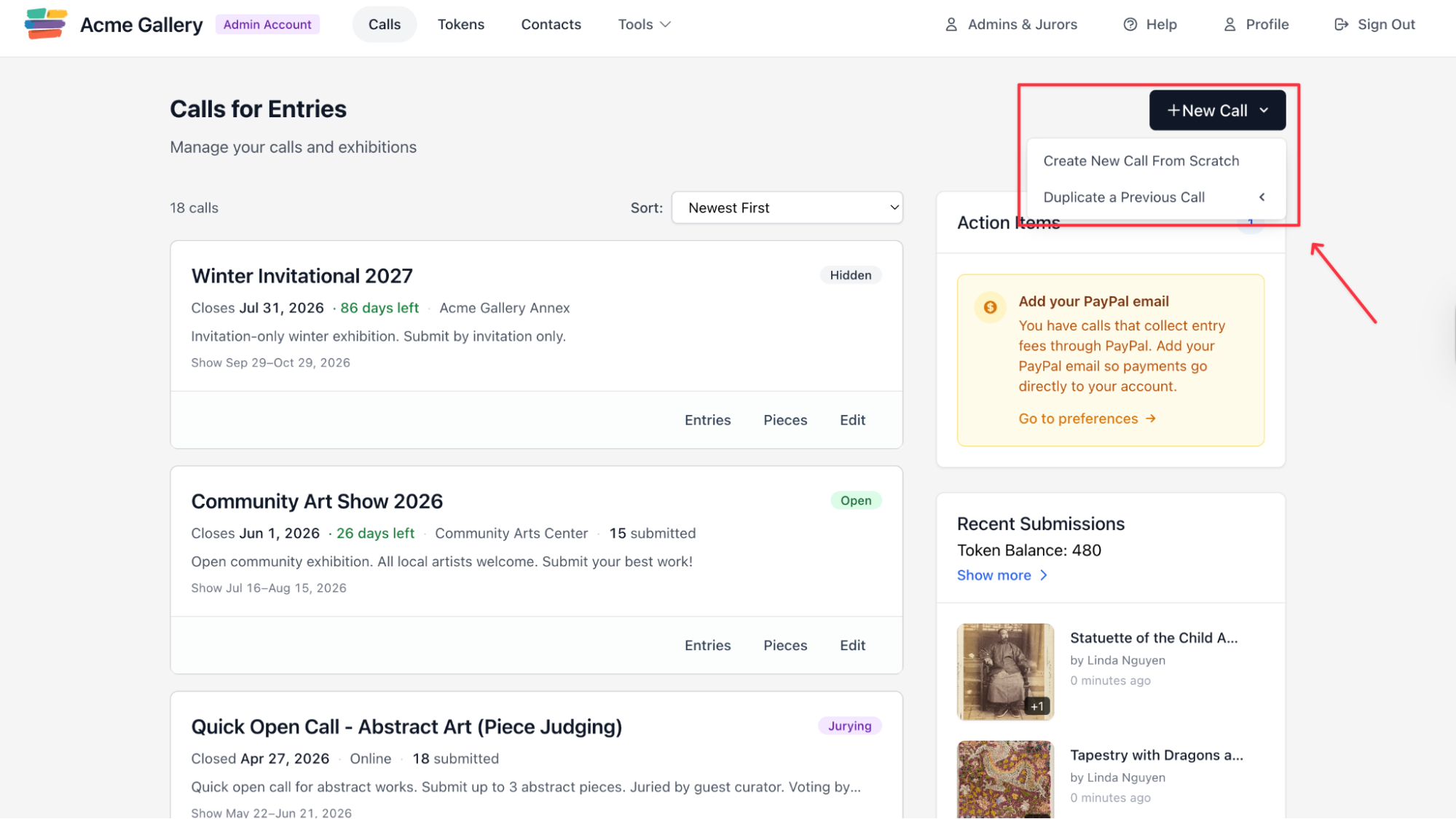
Everything starts from your admin dashboard. On EntryThingy, click the New Call button in the top right corner of your Calls for Entries page. You can either create a new call from scratch or duplicate a previous one if you are running a recurring show.
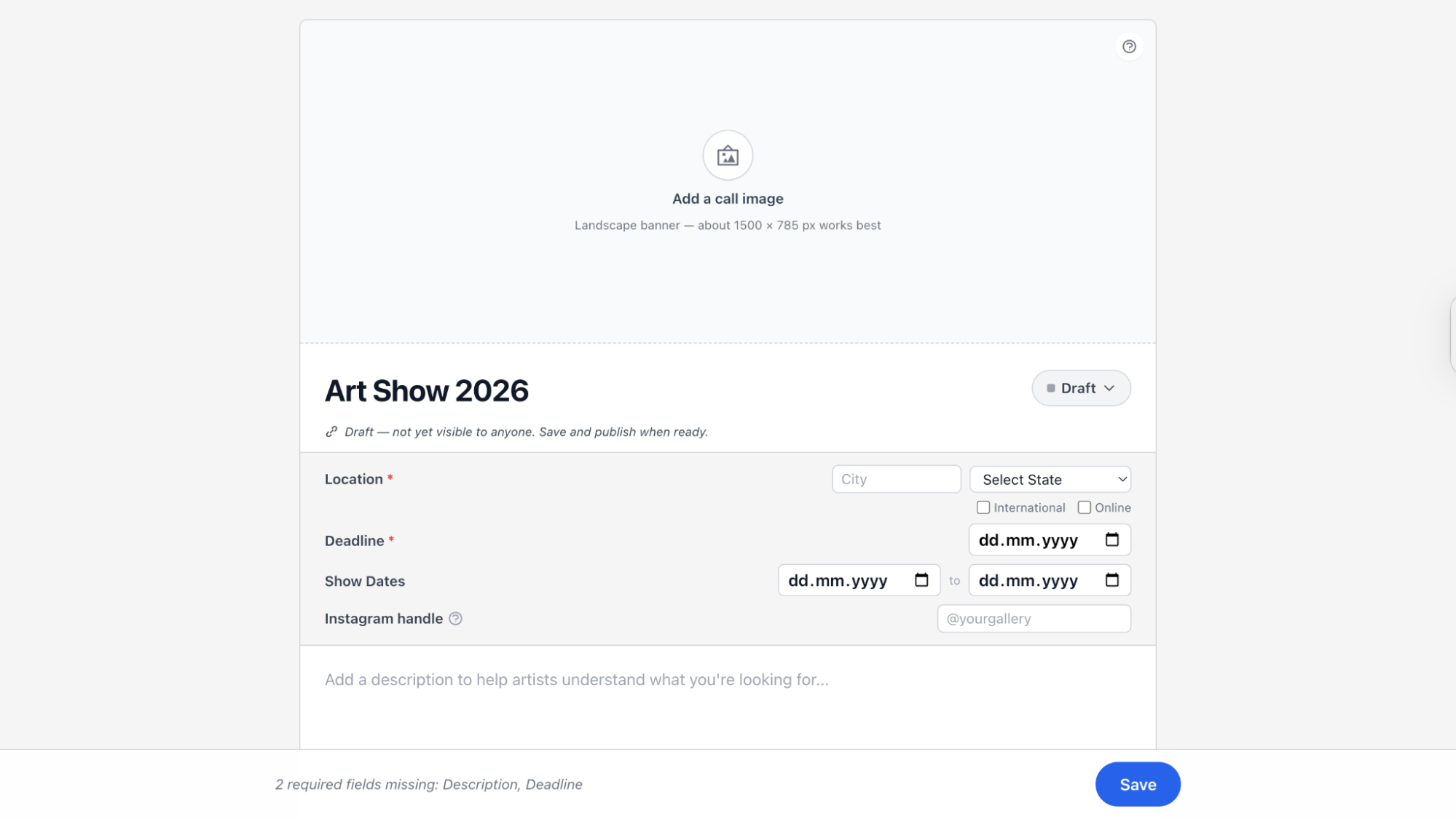
Once you create the call, you will land on the call setup page. This is where you fill in the essential details: the call name, location, submission deadline, show dates, your gallery's Instagram handle, and a description that helps artists understand what you are looking for.
The call stays in Draft mode until you are ready to publish, so it is not visible to anyone while you are setting it up.
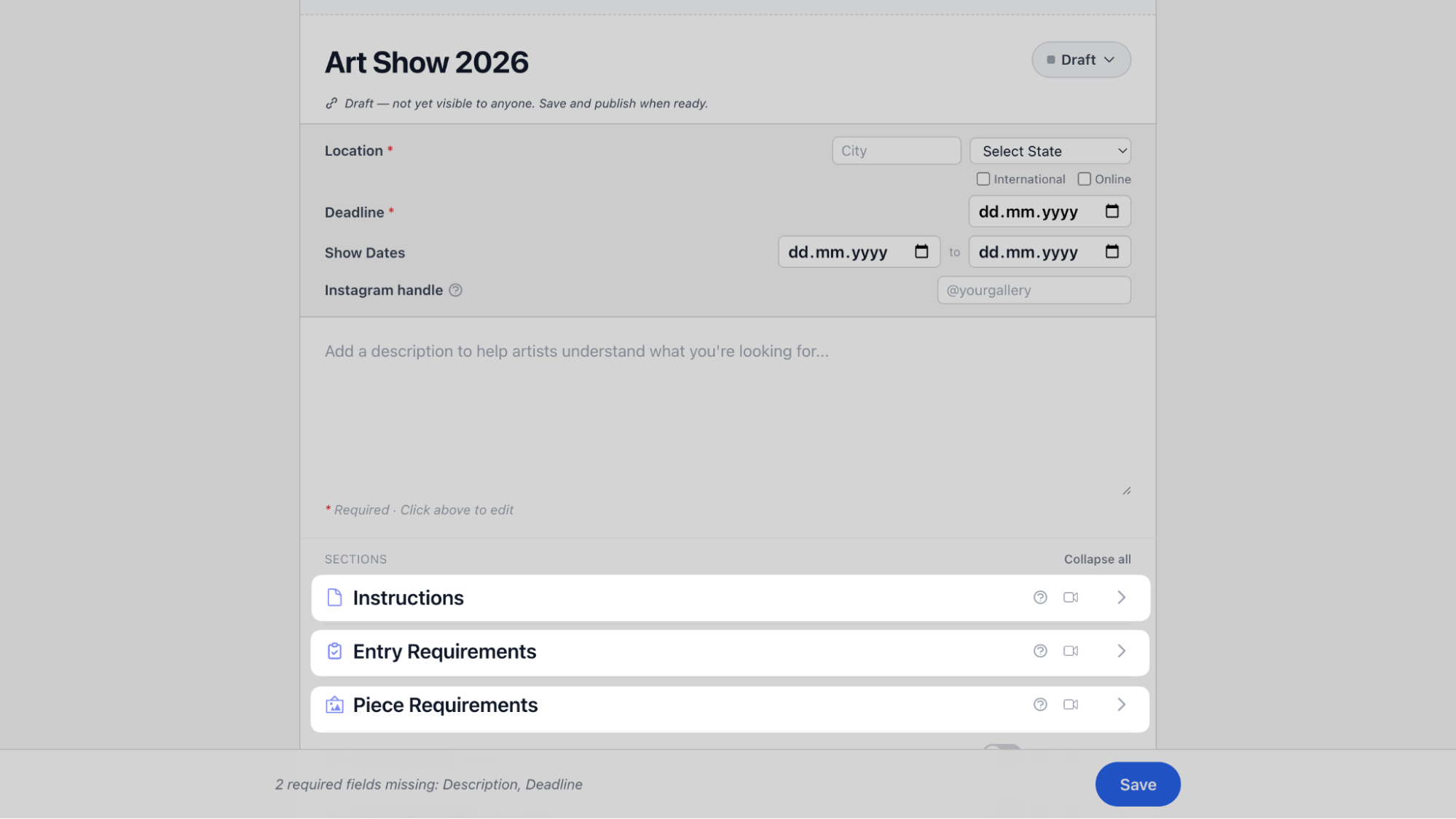
Below the basic details, you will find three sections to configure: Instructions, Entry Requirements, and Piece Requirements. These are where you define exactly what artists need to submit and how.
Step 2: Select Your Jury Format
Once your call is set up, the next decision is how the submitted work will be evaluated. On EntryThingy, you will find this in the Jury Settings section of your call. Under "Vote by", you choose between two options: Entry or Piece.
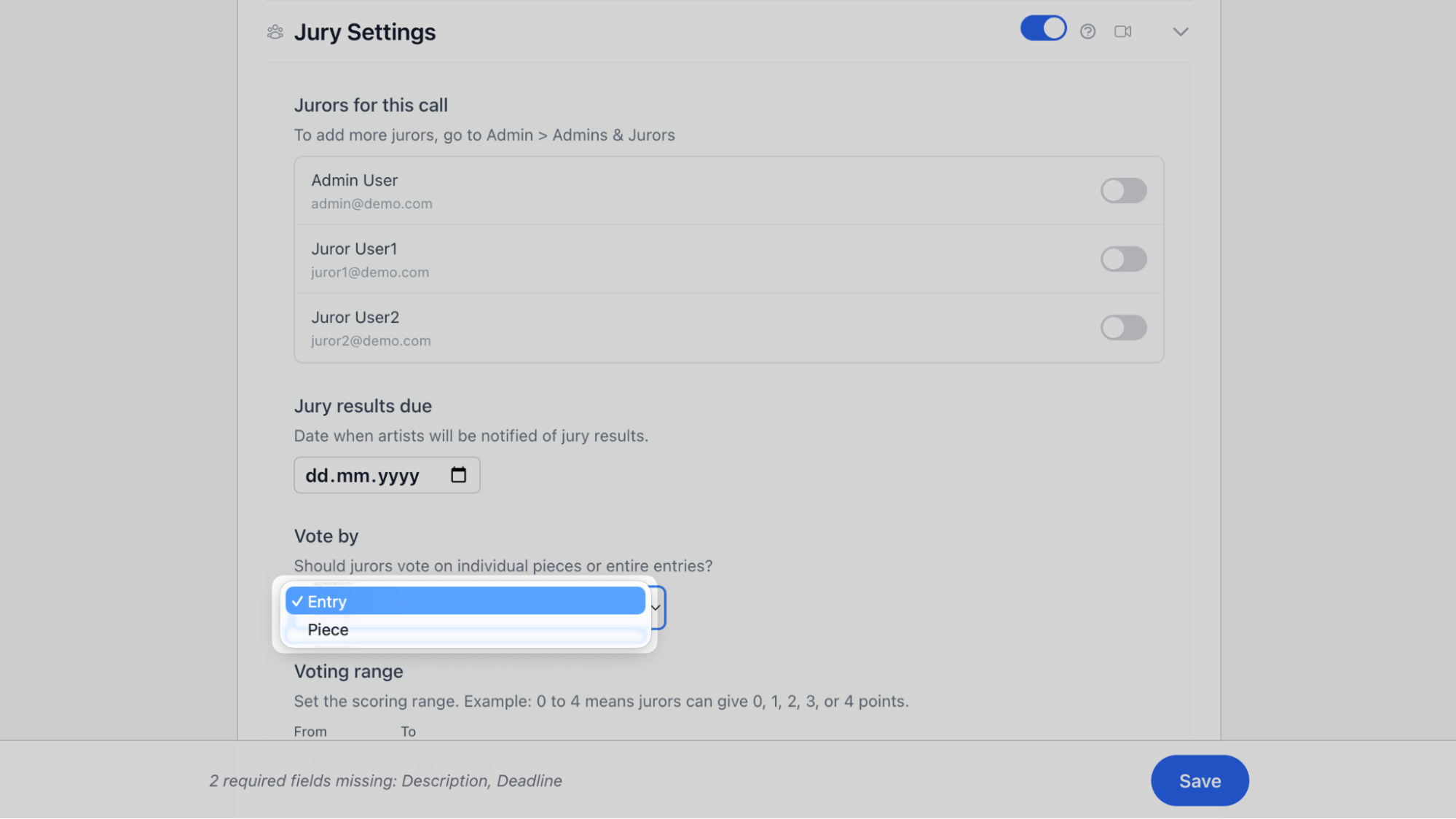
- In an entry-juried show, your juror evaluates each artist's full submission as one package. All their pieces, their statement, and any details they filled in are reviewed together. One decision is made on the submission as a whole. This works well when you are selecting which artists to include in the show. When you jury by entry, you are choosing the artist, not just the work. That distinction matters: the artists you accept become associated with your gallery, and over time those relationships shape how your program is perceived.
- In a piece-juried show, each individual artwork is scored separately. Two pieces from the same artist can end up with completely different outcomes. This works well when you are curating specific works for a themed exhibition, where the fit of each individual piece matters as much as the artist behind it.
Step 3: Define Your Scoring System and Judging Criteria
Once you have chosen your jury format, the next thing to configure is how submitted work will be scored. On EntryThingy, you have two things to set up: the voting range and the voting categories.
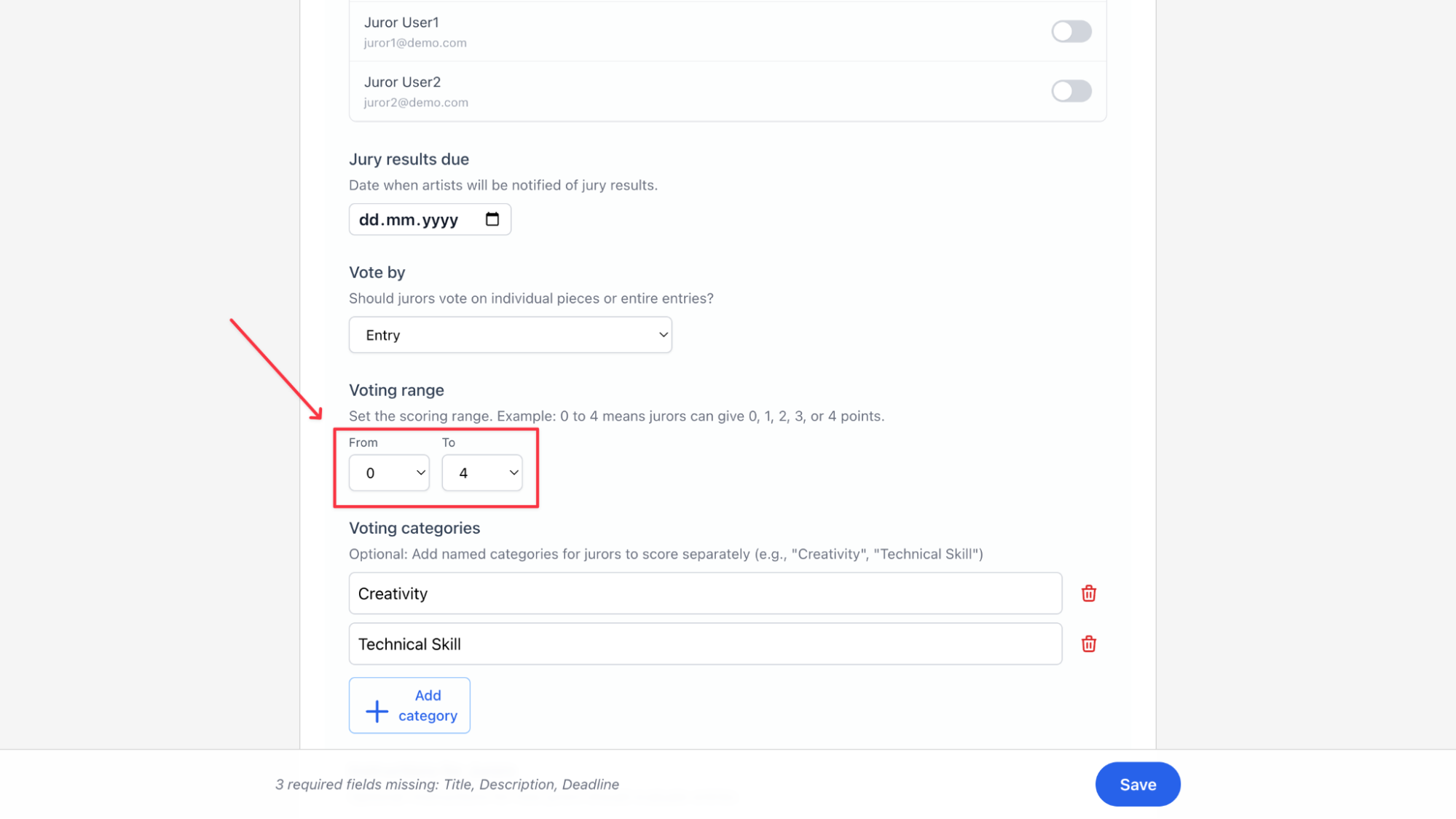
Voting range is the numerical scale your juror will use to score each submission. On EntryThingy, you set a From and To value. There are three common approaches:
- A range of 0 to 1 can work as a simple binary: yes or no, in or out.
- A range of 0 to 4 or 0 to 5 gives more nuance. It lets you build a ranked list and identify the strongest work more clearly.
- A wider range like 0 to 9 gives the most granularity but can slow down the review process on larger calls. This is better if you have many jurors looking at many entries. If you want to take an average or sum up points, this will allow you to get more granular results.
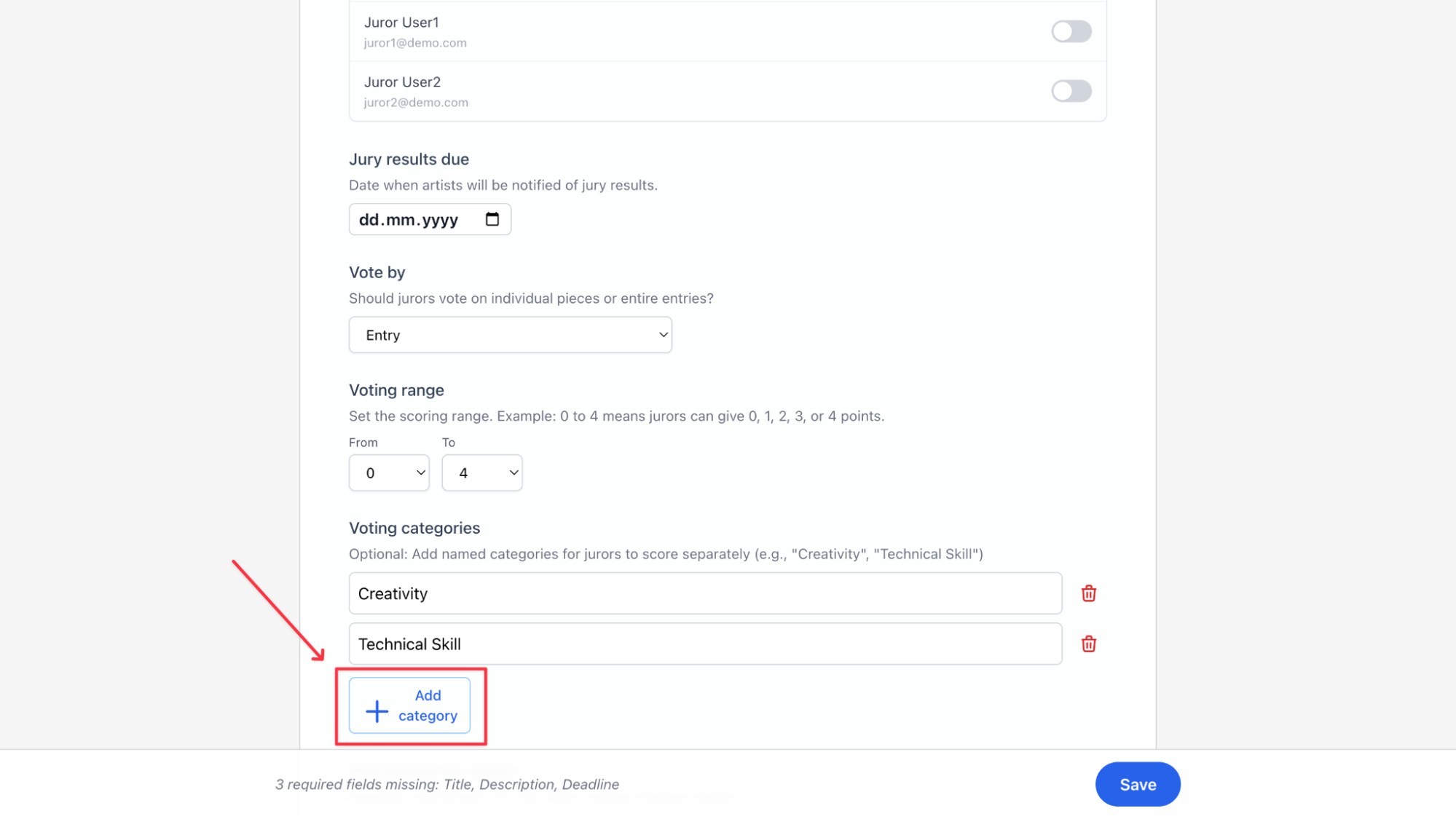
Voting categories let you go beyond one overall score and ask jurors to evaluate specific qualities separately. On EntryThingy, you can add as many named categories as you need, like Creativity or Technical Skill, each scored on the same range you set above.
Click Add category to add a new one.
If your call is straightforward, a single score per submission is enough. If you want more detailed data on each piece, categories give you that.
Just keep in mind that every category you add increases the time it takes your juror to get through the full submission pool. There is a distinct tradeoff here between the juror's time and the granularity in which you will choose entries. Each gallery and call has its own protocols. You should make sure that the jurors are well aware of what to expect when they are about to start jurying.
Step 4: Brief Your Jurors Before the Review Starts
Before your juror looks at a single submission, make sure they have everything they need to score confidently and consistently.
Send a briefing email first. Tell them the goal of the show, the theme, the audience, and how many works you are looking to accept. That last part is important. Without a target number, jurors have no frame of reference for how selective to be. You will likely end up with too many or too few selections and need a correction pass after the fact. They should also look at your public call page and any other marketing materials to understand what the applicants saw.
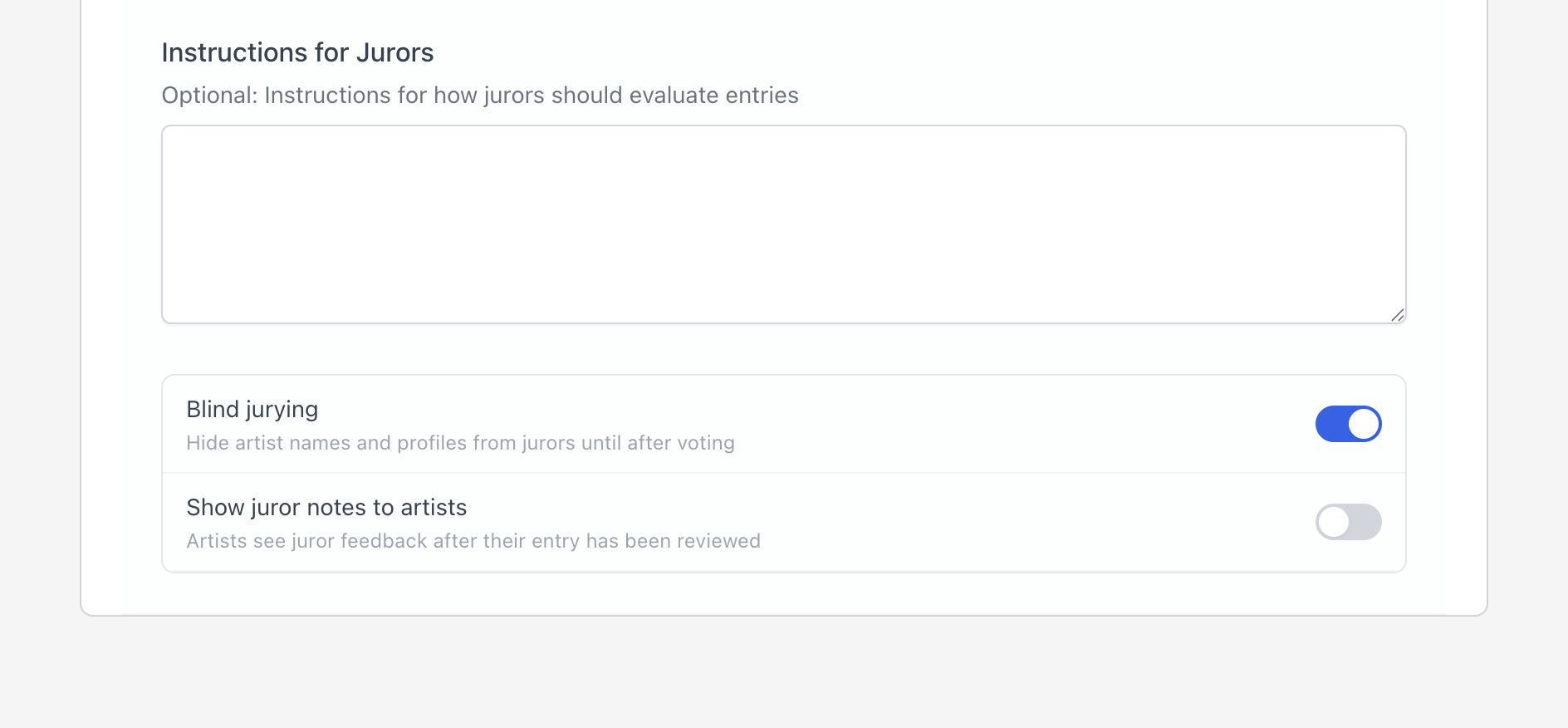
Use the Instructions for Jurors field on EntryThingy. In your call settings, there is a dedicated field for jury instructions. This is where you explain what each score means, what you are looking for in the work, and any other guidance specific to this call. Your juror will see this directly on the jury wall before they start voting, so it is always visible as they review.
Pro tip: One practical thing to check before your juror logs in: make sure they have been assigned to the call in your settings and that submissions have been moved to jury status. If either of these is missing, your juror will log in, see nothing, and email you. A quick test run before review opens catches this every time. You can even temporarily set yourself to be a juror, so you can go through the entire process as a test run.
Step 5: Use Blind Review to Reduce Bias
Blind review means your reviewer scores the work without seeing who submitted it. No artist name, no location, no bio. Just the work.
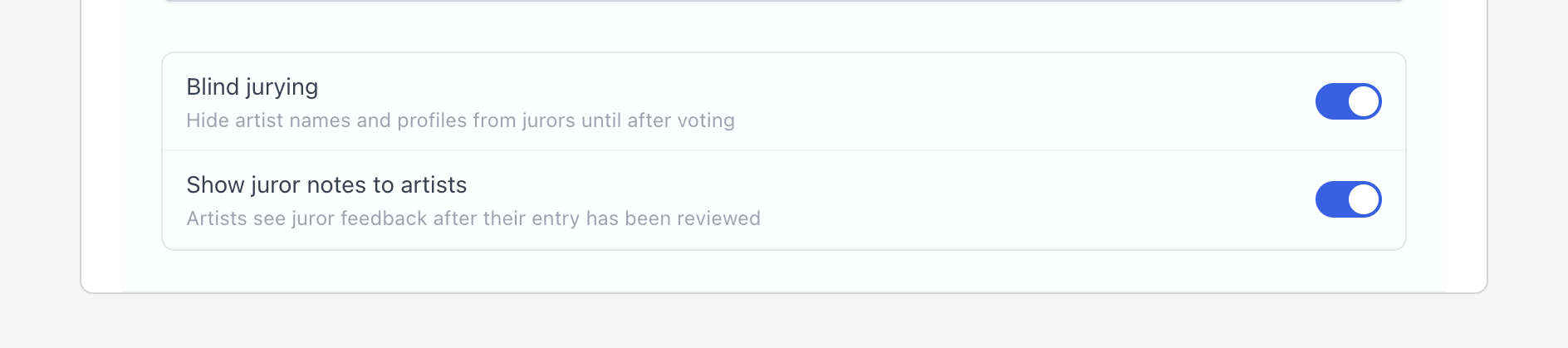
On EntryThingy, you turn this on with a single toggle in your call settings. You will also find a second option there: Show juror notes to artists.
When enabled, artists can see the feedback your juror left on their entry after the review is complete. Both settings are independent, so you can use one, both, or neither depending on how you want to run the show.
Pro tip: blind review only works if identifying information is not leaking through other fields. A piece title that includes the artist's name, or a statement that opens with "I am a painter based in..." can give it away before the juror even looks at the work. Review your submission form with this in mind before submissions open.
Also, let artists know upfront that the call is blind juried, so they can adjust what they include in their description and statement accordingly.
Step 6: Review Submissions in Two Passes
Here is something most organizers do not think about: the order in which a reviewer scores submissions affects the results.
If a reviewer starts scoring from the very first submission, they have no sense yet of what the full pool looks like. So average work that comes in early gets scored too high, and strong work that comes in later gets judged against a higher bar. By the end, the scores are inconsistent without anyone realizing it.
The fix is simple. Ask your reviewer to scroll through all submissions once before scoring anything. No decisions, just looking. It takes about twenty minutes and gives them a real sense of the range before they start making calls. The scoring pass that follows will be much more consistent.
If you are working with a panel of reviewers, make sure they cannot see each other's scores until everyone is done.
When one reviewer scores something highly, others tend to follow, even if they would have scored it differently on their own. Keeping scores hidden until the end means each reviewer is making an honest independent judgment.
For platforms that support this workflow, see our comparison of the 8 best jury management tools for art competitions in 2026.
Step 7: Communicate Results Clearly and On Time
Most artists apply to several calls at the same time. They are tracking deadlines and waiting for responses. If you said six weeks, they are expecting an email in six weeks. When it does not come, they follow up, and you are now managing dozens of individual inquiries instead of sending one announcement.
If something delays your timeline, communicate before the deadline passes, not after. A short note costs almost nothing.
Decline notifications should be direct. "Your work was reviewed and not selected for this exhibition" is clear and respectful.
For accepted applicants, you need to send operational information: shipping instructions, installation requirements, commission terms, and a contact name for questions. The smoother you make their next step, the smoother the process goes.
On EntryThingy, you can send result notifications directly from the platform through the Emails tool. You will find it under Tools in your admin navigation.
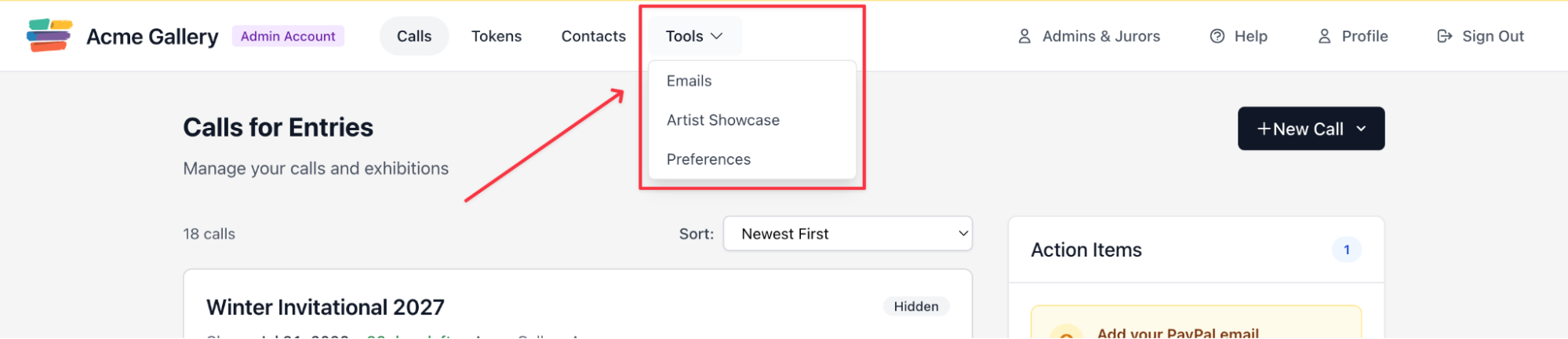
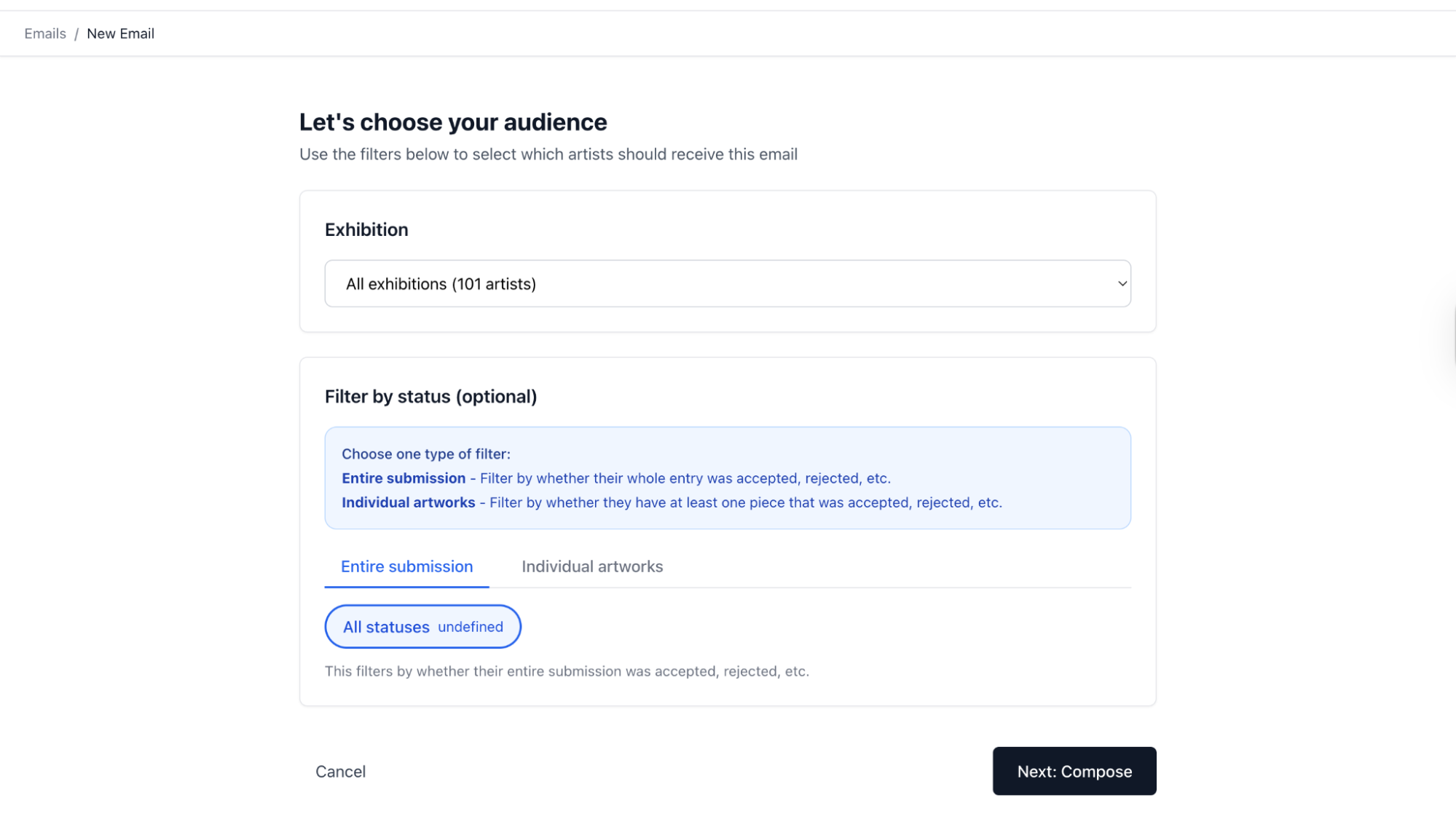
From there, you choose your audience, filter by submission status, whether accepted, declined, or waitlisted, and compose your message. You can send to all artists at once or target specific groups separately.
For what that process looks like from the applicant's side, our guide on how to apply to art calls covers what artists are expecting to receive and when.
Pro tip: One of the most effective things you can do as an organizer is set your result date before the call even opens and communicate it clearly to artists from the start.
On EntryThingy, you can do this through the jury results due date field in your call settings. Artists see this date and know exactly when to expect a response, which reduces follow up emails and builds trust before results are even announced.
When the time comes, you can also schedule your result emails directly in the Emails tool so they go out automatically on the date you set. You do not need to remember to send them manually or worry about delays. Set it up when you are ready, choose your send date, and the platform handles the rest.
Step 8: Track Your Jury Data to Improve Future Calls
Every completed jury produces information that most organizers look at once and discard.
Submission volume, medium breakdown, geographic distribution, acceptance rate, score distribution: this is data that makes your next call better if you keep it.
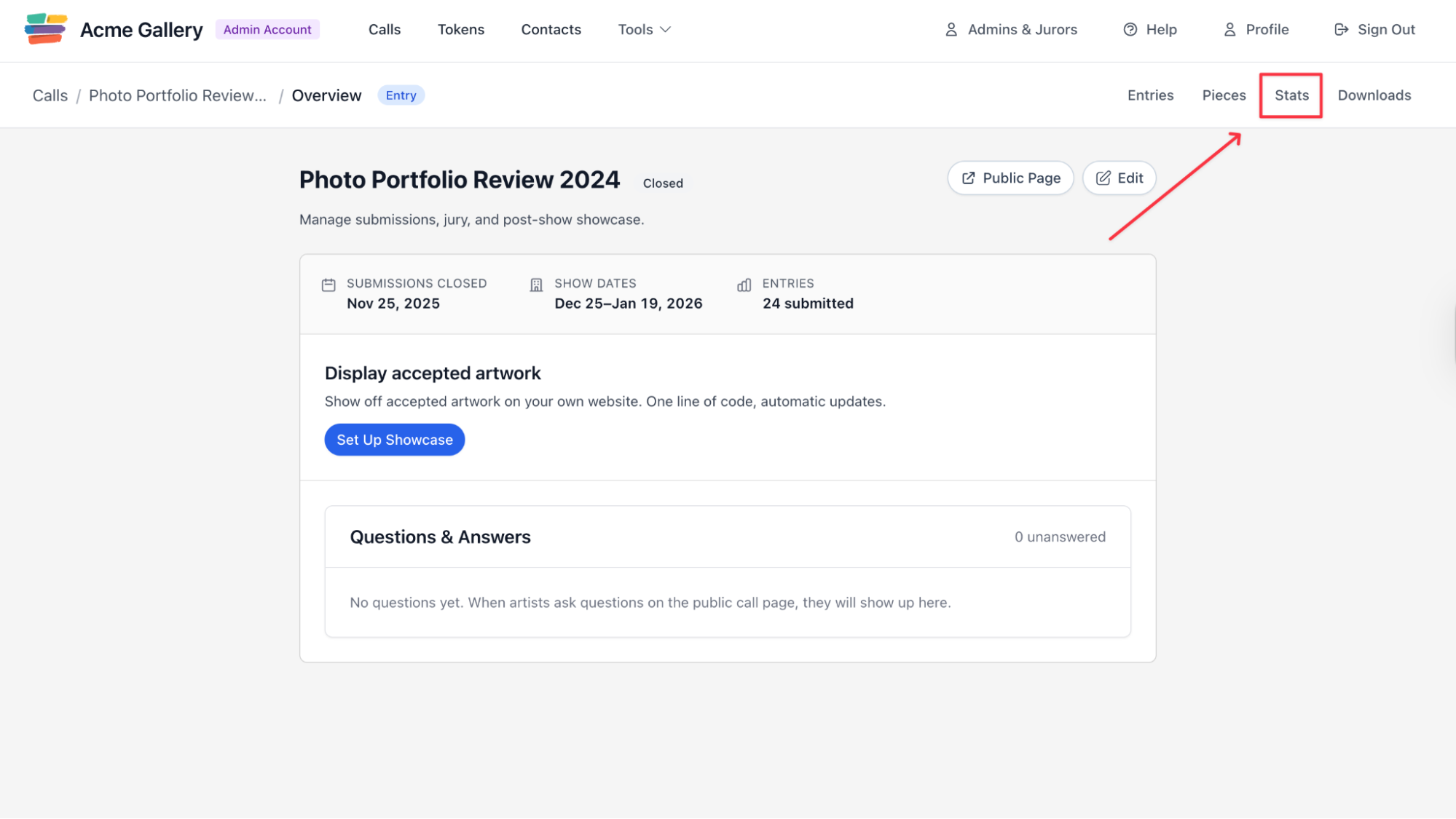
On EntryThingy, each call has a Stats tab that gives you a clear picture of how the show performed. You can access it directly from your Calls dashboard by clicking into any call and selecting Stats in the top navigation.
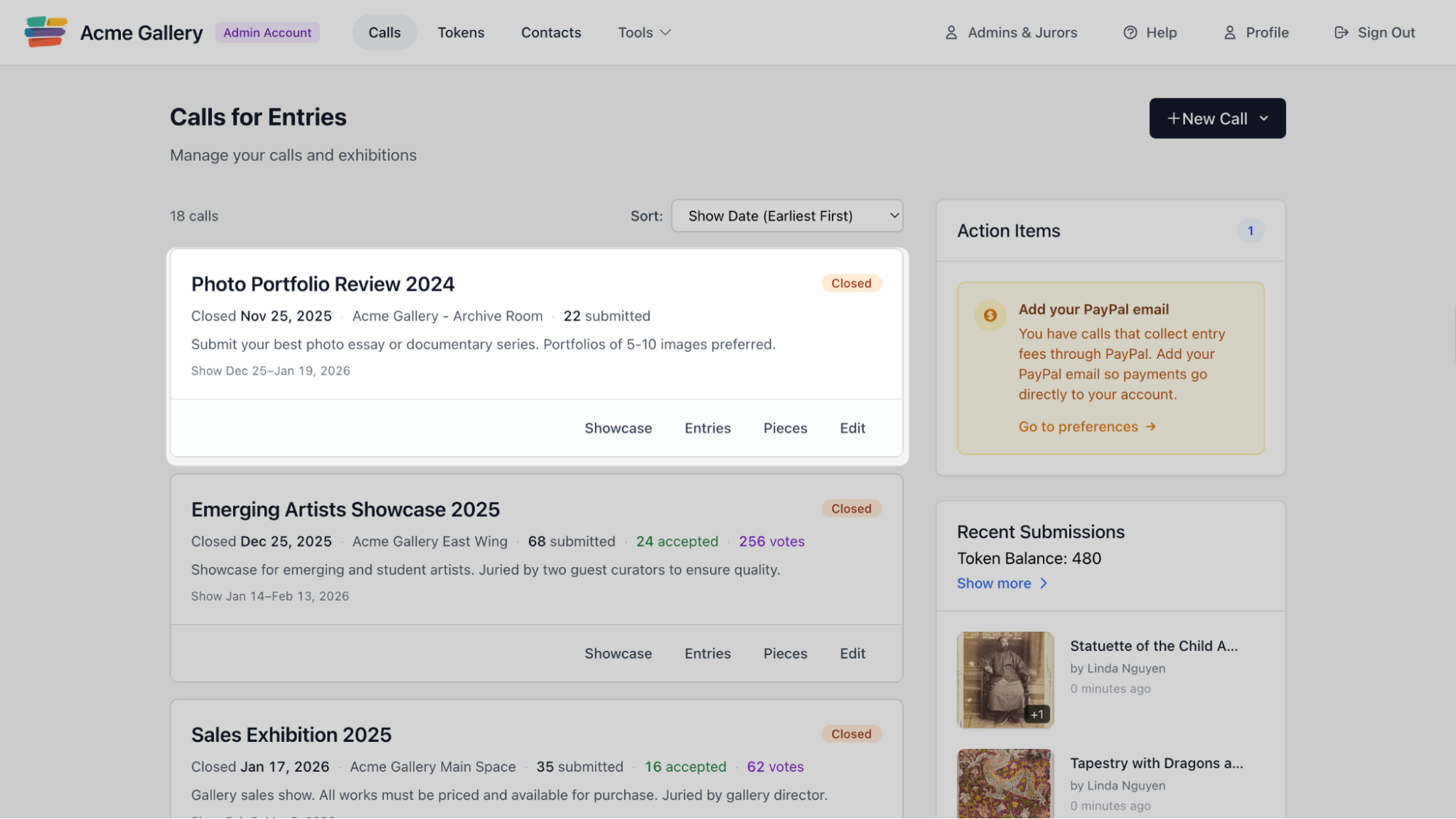
The data you find there tells you things that are hard to see in the moment: how many submissions came in, how many were accepted, how votes were distributed across the scoring range.
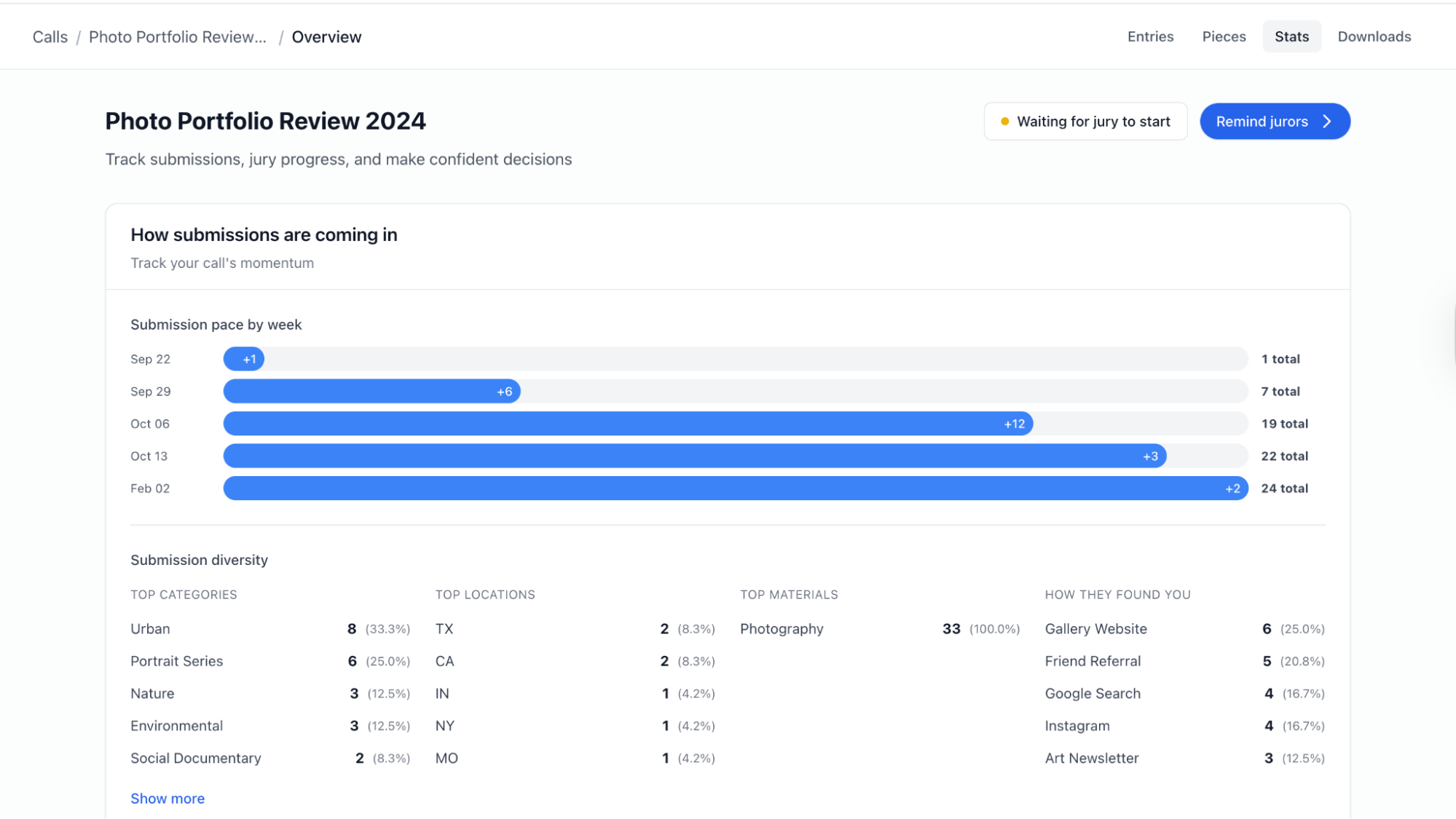
Over time, this information answers the questions that shape your next call.
Does your entry fee structure attract the applicants you want?
Are you receiving work in the mediums your exhibition is built around?
Organizers who run strong calls year after year are almost always the ones who treat each jury as something to learn from, not just something to complete. A gallery with several years of clean submission history can answer questions about their program with confidence.
Ready to set up a juried call your artists will trust? Create your free EntryThingy account and have your first call live in under ten minutes.
Start Your First CallCommon Mistakes When Jurying an Art Show
Not deciding the jurying model before the call opens. Switching from entry to piece jurying mid-process, or realizing mid-review that your setup does not match what you intended, creates problems with no clean fix.
Not giving your reviewer a target number. If you do not tell your reviewer how many works you are looking to accept, they have no way to calibrate how selective to be. You will likely need a correction pass after results come in.
Skipping the scoring brief. When reviewers interpret the scoring scale differently, the results are not comparable. Define what each score means before anyone starts.
Starting to score without a calibration pass. Reviewers who score without first seeing the full pool apply inconsistent standards across the call. A single pass through the submissions before scoring starts fixes this almost entirely.
Going quiet when results are delayed. If something pushes your timeline back, tell applicants before the original date passes. One short email prevents dozens of follow-up messages asking for an update.
Understanding what your juror experiences on the other side of the process helps you set things up better. Our guide on how to jury an art show covers the full juror experience.
What This Means for Your Next Art Show
How you run your jury process affects more than just this show. Artists remember which calls were organized, communicated clearly, and delivered results when they said they would. They also remember the ones that did not.
That reputation follows you. The artists who apply to your next call will have heard about your last one, including from people you declined. A process that feels fair and professional brings stronger submissions next time. One that feels disorganized does the opposite.
If you are building out a full submissions and exhibition management workflow, our roundup of tools for art galleries covers the main options.
EntryThingy handles the full jury process in one place: submissions, blind review, scoring, panel coordination, and artist notifications, with no annual fees and no per-call costs. You pay per submission, only when artists submit.
FAQs About Jurying an Art Show
What is the difference between entry jurying and piece jurying?
Entry jurying evaluates each submission as a complete package, one decision per applicant. Piece jurying scores each artwork individually. Use entry jurying when you are selecting artists. Use piece jurying when you are curating specific works for a themed exhibition.
How are art competitions judged?
Most juried art shows use a numerical scoring system or a panel vote to evaluate submitted work. Reviewers score each submission based on criteria set by the organizer, which typically include quality, originality, and fit with the exhibition theme. Scores are aggregated after all reviewers have finished, and the highest-ranked work is selected up to the number of available spots.
What do jurors look for in artwork?
Jurors are looking for work that fits the specific exhibition: the theme, the medium, and the audience. Image quality matters a lot in digital review, because a poorly photographed piece creates an impression before the juror has evaluated the work itself. Artists who match their submission to the stated theme and submit clean, well-lit images are selected at higher rates across every medium we track.
How long does jurying take?
It depends on the scale of the call and the number of reviewers. A single reviewer evaluating 100 submissions with a simple accept/decline system can finish in a few hours. A panel reviewing 500 entries with a multi-category rubric may take several days. Building in a calibration pass adds time upfront but reduces back-and-forth and correction passes at the end.
Should we use one juror or a panel?
Single jurors are more common for open calls and group exhibitions. Panels are more common for awards and highly competitive calls. A single juror is easier to coordinate and produces a more consistent selection. A panel introduces multiple perspectives but requires careful setup to prevent score anchoring and ensure reviewers are evaluating independently.
What should decline notifications say?
Be direct. "Your work was reviewed and not selected for this exhibition" is clear and respectful. Avoid language that sounds like it was written to soften the message. Applicants read through it, and a straightforward sentence treats them with more honesty than a carefully worded non-answer.
What data should we keep after a jury closes?
At minimum: total submissions received, medium breakdown, acceptance rate, and score distribution. This is the information that makes your next call better, whether you are calibrating your fee structure, adjusting eligibility criteria, or briefing a new reviewer on what the pool typically looks like.